
Three online follow up courses to be organized for the MTTS 2020 and (Selected) OFCM 2020 participants.
The courses offered are
- for participants of OFCM 2020 – Real number system and sequences
- MTTS 2020 Level O, Level 1, Level 2 combined – A conceptual introduction to several variable calculus
- MTTS 2020 Level 1 & 2 combined – Polynomials and field extensions
Each of these courses will have 8 lectures.
The classes will be conducted online on selected weekdays during 4pm to 6pm and on Sunday morning during 10:30AM -12:30PM. This is a tentative schedule.
The online camps will be held during second week of February 2021 to the middle of March 2021.
Application form will be open during 26th January to 30th January 2021. Link to the application form will be emailed to the (Selected) OFCM 2020 and MTTS2020 participants by January 25th evening/26th morning.
Speaker
- Real number system and sequences – Instructors : Dr. Srinivasan P.S. / Dr Vikram Aithal, Prof. B K Sarma
- A conceptual introduction to several variable calculus – Instructor : Prof. S Kumaresan
- Polynomials and field extensions – Instructor Dr. Ananthnarayan Hariharan
Programme Details
Duration : 08/02/2021 to 14/03/2021Abstract of the talk
A Conceptual Introduction to Several Variable Calculus
The requisite background is Linear Algebra of $\R^n$, Norms on $\R^n$ and one variable calculus as developed in “A Basic Course in Real Analysis” by Ajit Kumar and Kumaresan. The course will focus on concepts, a good set of examples, total derivative, directional derivatives, chain rule, Jacobian matrix and Mean Value theorem. The setting will be functions from $\R^m$ to $\R^n$.
Important dates
The application form will be open during 26th January to 30th January 2021, and selected students will be informed by 3rd February 2021.
Link to the application form has been emailed to the (selected) OFCM2020 and MTTS2020 participants. In case they do not receive our email by 26th January Evening, please drop an email with their name, programme participation details like their serial number to mttsonlineservices at gmail.com before 27th Afternoon.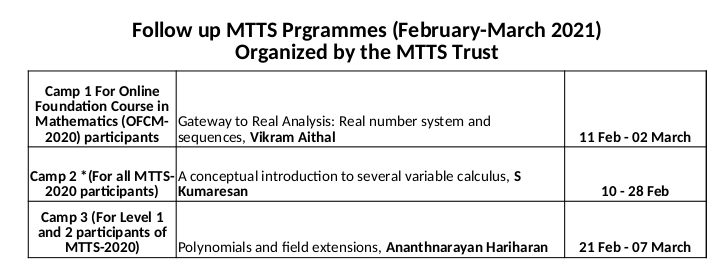
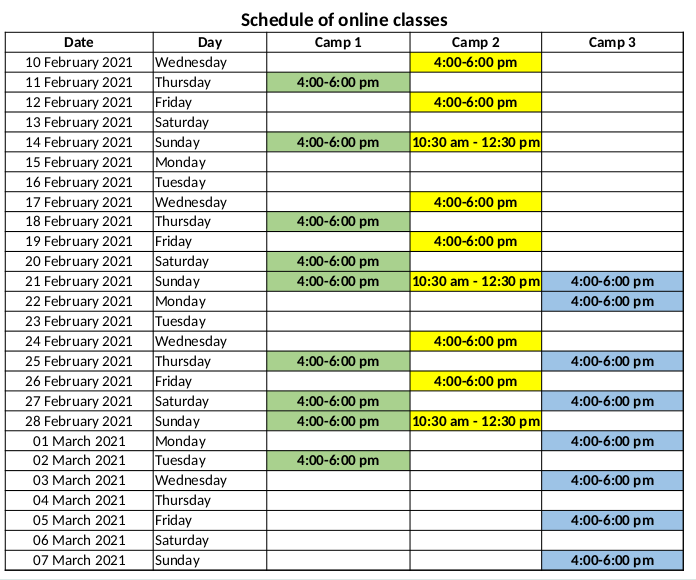
You may also check the schedule of classes at this link.